



As a supplier of Metro Screens, I've had the privilege of witnessing firsthand the technological marvels and the intricate mechanisms that make these screens function seamlessly. In this blog, I'll delve into the inner workings of Metro Screens, exploring the components, the technology behind them, and how they serve various purposes in different settings.
Components of a Metro Screen
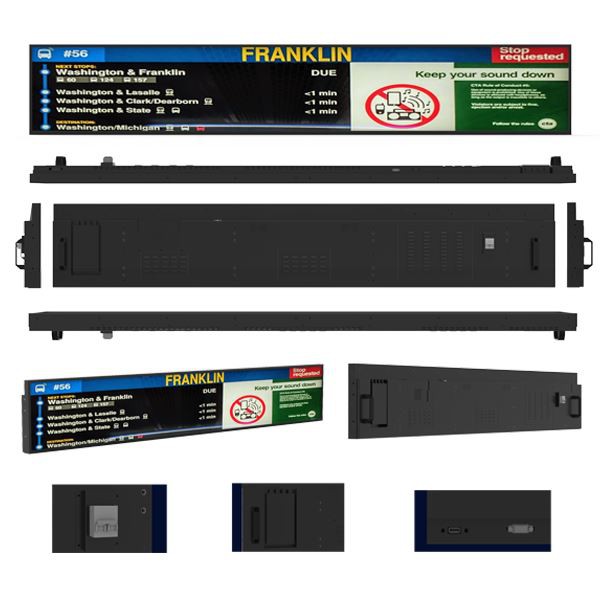
At the heart of a Metro Screen lies a combination of hardware and software components that work in harmony to deliver high - quality visual content. The primary hardware components include the display panel, the control board, the power supply, and the housing.
The display panel is perhaps the most visible and crucial part of the Metro Screen. It can come in various types, such as LCD (Liquid Crystal Display) or LED (Light - Emitting Diode). LCD panels are known for their energy efficiency, sharp image quality, and wide viewing angles. They use liquid crystals that can be manipulated to block or allow light to pass through, creating the images we see on the screen. On the other hand, LED panels are brighter and more suitable for outdoor or high - ambient - light environments. They use an array of light - emitting diodes to produce light and color.
The control board is the brain of the Metro Screen. It manages the input signals, processes the data, and controls the display settings. It can receive signals from various sources, such as a computer, a media player, or a network connection. The control board ensures that the content is displayed correctly, adjusting for factors like resolution, color calibration, and refresh rate.
The power supply provides the necessary electrical energy to run the screen. It converts the incoming electrical power into the appropriate voltage and current levels required by the display panel and the control board. A stable and reliable power supply is essential for the proper functioning of the Metro Screen, as any fluctuations or interruptions can cause display issues or even damage the components.
The housing serves as the protective shell for the internal components. It is designed to be sturdy, durable, and aesthetically pleasing. The housing also provides proper ventilation to prevent overheating of the components, which can affect the performance and lifespan of the screen.

How Metro Screens Receive and Process Content
Metro Screens can receive content in several ways. One common method is through a direct connection to a media player or a computer. In this case, the user can simply plug in a USB drive or connect the screen to a computer via an HDMI or VGA cable. The media player or the computer then sends the content to the screen, which is displayed immediately.
Another way is through a network connection. Metro Screens can be connected to a local area network (LAN) or the internet, allowing them to receive content remotely. This is particularly useful for large - scale installations, such as in a subway station or a shopping mall, where multiple screens need to be updated simultaneously. The content can be managed and distributed from a central server, which can schedule the display of different content at different times.
Once the content is received, the control board processes it to ensure that it is compatible with the display panel. It may need to adjust the resolution, format, or color settings to optimize the visual quality. For example, if the incoming content has a different aspect ratio than the screen, the control board will either crop the image or stretch it to fit the screen.
Applications of Metro Screens
Metro Screens have a wide range of applications, thanks to their versatility and high - quality display capabilities. One of the most common applications is in advertising. Wall Mounted Bar Advertising Screen can be installed in bars, restaurants, and other public places to attract customers' attention and promote products or services. These screens can display dynamic and engaging advertisements, which are more effective than traditional static posters.
In retail environments, LCD Shelf Display are used to provide product information, pricing, and promotions directly at the point of sale. This helps customers make more informed purchasing decisions and can increase sales. The screens can also be integrated with inventory management systems, allowing for real - time updates of product availability and pricing.
Metro Screens are also used in transportation systems, such as subway stations and airports. Metro Screen Doors can display arrival and departure times, route information, and safety announcements. This improves the passenger experience and helps to keep people informed and safe.
Maintenance and Troubleshooting
To ensure the long - term performance of Metro Screens, regular maintenance is essential. This includes cleaning the display panel to remove dust and fingerprints, checking the connections for any loose or damaged cables, and updating the software on the control board.
In case of any issues, troubleshooting can be done to identify and fix the problem. Common problems include display artifacts, such as lines or spots on the screen, poor image quality, or the screen not turning on. These issues can often be resolved by checking the power supply, the connections, or the settings on the control board. If the problem persists, it may be necessary to contact a professional technician for further diagnosis and repair.
Conclusion
In conclusion, Metro Screens are complex and sophisticated devices that rely on a combination of hardware and software components to function effectively. They offer a wide range of applications, from advertising to transportation, and can significantly enhance the user experience. As a supplier of Metro Screens, I am committed to providing high - quality products and excellent customer service. If you are interested in purchasing Metro Screens for your business or project, I encourage you to contact me for a detailed discussion and to explore the best solutions for your needs.
References
- Principles of Display Technology by John Wilson
- Digital Signage Handbook by Mark Smith